

Easy Checks for ISO SOP Software in Australia

Post by
John Ansley
September 1, 2026
September 1, 2026
Australian manufacturers evaluating digital SOP platforms for manufacturing face a familiar problem: platforms that look great in the demo but fail on the factory floor. When frontline workers can't figure out how to use the system, ISO compliance documentation becomes another pile of digital paperwork nobody follows.
What is Digital SOP Software for Manufacturing?
Digital SOP software replaces paper-based manuals with electronic procedures that workers access on computers, tablets, or mobile devices. Knowby creates visual standard operating procedures combining video, images, and text that operators follow step by step at the workstation.
What makes a digital SOP platform ready for ISO compliance?
ISO compliance requires more than creating procedures and hoping people follow them. The standard expects documented evidence that procedures are current, approved, accessible, and actually used.
A compliant platform should track every version change with timestamps and user attribution. Approval workflows ensure that procedure updates go through proper review before publication. Training records show which workers have accessed and completed each procedure.
How do Australian manufacturers benefit from visual SOPs?
Australian manufacturing sites face specific challenges that visual SOPs address directly. Many facilities operate with multilingual workforces, in which English may be a second or third language for some operators. Text-heavy documentation creates comprehension barriers that visual instructions bypass.
Remote and regional manufacturing sites often have unreliable internet connectivity. Platforms with offline functionality let workers access guides in low-connectivity environments without interruption.
Knowby's mobile-first approach means operators access visual standard operating procedures directly at the machine, reducing the time spent walking to shared terminals or printing updated copies. When procedures exist as short, clear, and visual guides, workers tend to complete tasks correctly the first time.
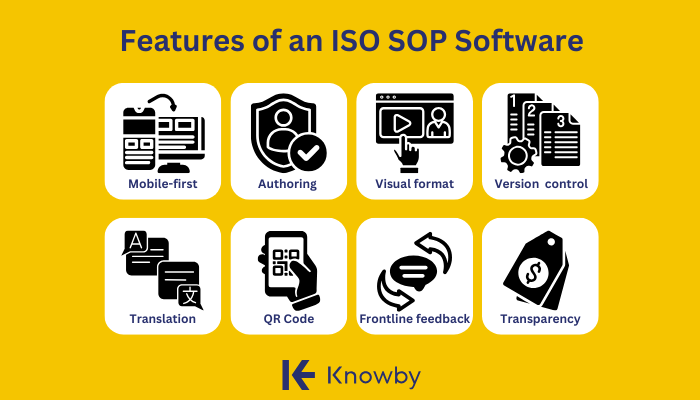
Quick guide: 8 ease-of-use criteria for ISO SOP software
- Mobile-first design: Can workers access instructions offline in low-connectivity areas?
- Authoring simplicity: Can subject matter experts create content without IT support?
- Visual instruction formats: Does the platform support video, images, and step-by-step guides?
- Version control: Are audit trails and approval workflows built in?
- Translation capabilities: Can you reach multilingual teams without manual copy-pasting?
- QR code delivery: Can workers scan to access the right procedure at the right time?
- Frontline feedback: Can operators flag issues directly from the instruction?
- Pricing transparency: Do you know the full cost before talking to sales?
The 8 best ease-of-use criteria for ISO SOP software
Here's a more in-depth guide on the essential features to look for in an ISO SOP software, particularly in Australia:
1. Mobile-first design: Accessible for deskless manufacturing workers
A mobile-first platform means the interface was designed for smaller screens, touch interactions, and intermittent connectivity, not retrofitted from a system that assumes a desk and a stable connection, like most traditional knowledge systems. When evaluating platforms, test the mobile app yourself. Can you complete a procedure from your phone without frustration?
Mobile-first design features
- Touch-optimised interface: Buttons and navigation sized for gloved hands and quick taps
- QR code scanning: Built-in camera access to scan equipment codes
2. Authoring simplicity: Empower subject matter experts
The people who know your processes are rarely the people who know how to use complicated software. If creating an SOP requires a technical writer or IT support, updates get delayed, and tribal knowledge stays trapped in people's heads.
Ask whether your line supervisors and experienced operators can create a procedure themselves, without training. If the answer is no, frontline adoption will struggle.
Authoring simplicity features
- Drag-and-drop editors: Visual content arrangement without coding or formatting knowledge
- Template libraries: Pre-built structures for common procedure types
- AI-assisted creation: Tools that convert video or text into structured guides automatically
3. Visual instruction formats: Beyond text-heavy documents
A 20-page PDF filled with paragraphs of text doesn't help an operator complete a task correctly. Research on knowledge retention shows that visual instructions improve comprehension and task completion success compared to text alone.
Check whether the platform supports video segments, annotated screenshots, images with callouts, and step-by-step visual guides. Short, clstepear, and visual guides reduce errors on the factory floor.
Visual instruction formats features
- Video support: Embedded clips showing the correct technique
- Image annotations: Screenshots with arrows, highlights, and callouts
- Step segmentation: Procedures broken into discrete, followable actions
4. Version control: Built-in audit trails for ISO compliance
ISO 9001 and similar standards require documented evidence of procedure version history, change approvals, and training completion. If your platform doesn't track who changed what and when, you'll spend audit prep time manually reconstructing that information.
Tracking and approval workflows should be native to the platform, not an add-on that costs extra or requires enterprise tiers.
Version control features
- Change history: Complete log of all edits with timestamps and user attribution
- Approval workflows: Required sign-offs before new versions go live
- Previous version access: Ability to view and restore earlier procedure versions
5. Translation capabilities: Reaching multilingual teams
Australian manufacturing sites often employ workers from diverse language backgrounds. Expecting everyone to follow complex procedures in their second language increases error rates and safety risks.
Look for platforms with instant translation capabilities rather than manual copy-pasting between documents. Knowby supports over 140+ languages with auto-translation and verified translation options.
Translation capabilities features
- Auto-translation: AI-powered conversion to multiple languages from a single source
- Verified translations: Option to have translations reviewed by human translators
- Language preferences: Workers select their preferred language and see content accordingly
6. QR code delivery: Just-in-time access at the workstation
The best SOP is useless if workers can't find it when they need it. QR codes printed on equipment, workstations, or packaging allow operators to scan and access the relevant procedure immediately.
This delivery method supports just-in-time learning: workers get the information at the moment they need it, not hours earlier in a training room.
QR code delivery features
- Code generation: Platform creates unique QR codes linked to specific procedures
- Direct linking: Scanning opens the procedure without navigating through menus
7. Frontline feedback: Operators flag issues directly
Procedures written by office-based teams often miss practical details that frontline workers notice immediately. A platform that allows operators to submit feedback directly from the instruction creates a feedback loop for continuous improvement.
Knowby includes feedback collection with text, image, and form submissions built into every instruction through Knowby Forms.
Frontline feedback features
- In-context comments: Workers flag issues at the specific step where they occur
- Image attachments: Photos showing problems or suggested improvements
- Form submissions: Structured feedback for quality checks and safety observations
8. Pricing transparency: Know what you'll pay before the sales call
Many SOP platforms hide pricing behind sales calls, custom quotes, and "contact us for enterprise pricing" pages. That opacity makes budgeting unpredictable and often signals volume negotiations, hidden fees, and surprise costs after you've committed.
Knowby publishes its pricing publicly: $5 per user per month with no minimum users, no lock-in contracts, and no locked features. The same product at the same price for everyone.
Pricing transparency features
- Published pricing: Full cost information available without sales contact
- No minimum users: Start with your current team size without forced commitments
- No feature tiers: All features included at every plan level
Comparison table: ISO SOP software ease-of-use criteria
| Criteria | Knowby | Typical Enterprise Platforms | Basic Document Tools |
|---|---|---|---|
| Mobile-first design | ✓ | ✓ | ✗ |
| Offline access | ✓ | Limited | ✗ |
| AI-powered content creation | ✓ | ✗ | ✗ |
| 140+ language support | ✓ | Limited | ✗ |
| QR code delivery | ✓ | ✓ | ✗ |
| Transparent published pricing | ✓ | ✗ | ✓ |
| No minimum user requirements | ✓ | ✗ | ✓ |
Why Knowby is the best ISO SOP platform for Australian manufacturers
Australian manufacturing teams need a platform that works for frontline operators, not just documentation managers. The platform captures tribal knowledge from your experienced operators through AI-powered video conversion, turning demonstration recordings into structured step-by-step guides. This reduces the time burden on subject matter experts while capturing the practical know-how that text-based SOPs miss.
Knowby includes tracking and approval workflows for ISO compliance documentation, built-in analytics to monitor training completion, and feedback collection so workers can flag issues directly. And you know exactly what it costs: $5 per user per month with no minimum seats and no locked features.
Knowby delivers clear, step-by-step digital instructions that combine video, images, and text in bite-sized learning modules. Australian manufacturers use Knowby to capture tribal knowledge from experienced operators and share it across shifts, sites, and language barriers.
The platform works on iOS, Android, and web, with offline capabilities for workers in remote or low-connectivity environments. Knowby's AI converts existing videos and documents into structured guides, cutting SOP creation time from hours to minutes.
Knowby features:
- AI-powered video conversion: Upload existing training videos and Knowby segments them into step-by-step instructions with accurate transcription
- Instant translation: Access content in over 140 languages so multilingual teams can follow procedures in their preferred language
- Offline mode: View guides in areas with limited internet connectivity
- QR code delivery: Workers scan a code at the workstation to access the exact procedure they need
- Tracking and approval workflows: Built-in version control and sign-off processes for ISO compliance documentation
- Feedback collection: Operators submit text, image, or form feedback directly from any instruction
Comments